
Excel: a False Phalanx
Learn Excel’s SUMPRODUCT function with arrays to match dropdown selections and return values. It's maths meets spreadsheets, the smart way.
Musings on the origin of the word Array, and a bit of maths fun with it…
Compiler writers are famously stuck for names for things. For this condition, Sun Systems compiler authors would have used: “_Ceaselessly.Challenged.With.Respect.To.Syntax.Appellations()”
English Royalty in old times would give a Commission of Array to leaders to muster and array citizens and to get them into condition for war. Maybe that inspired The First Compiler Writer to use Array. From military practice, s/he could just as easily have drawn Platoon, Regiment, Formation, Rank, or made a word up, contracting “Serried Ranks” into a Serry, perhaps, or gone civilian, with Group or Echelon.
I have always felt that array is about clothes, and would have chosen Phalanx, as in: Greek soldiers lined up in close formation, shield to shield.
Anyway, ARRAY stuck, and the creators of Excel stuck with it. The following, for those who hanker after high school maths rather than the “usual” way of doing things, is an example using an array, (but not an “array formula”, which is something different again).
The objective is to list only the amount against the month selected in the drop-down in cell H1 (named TheMonth).
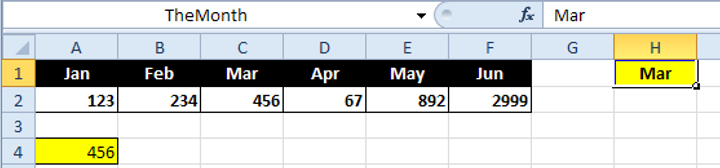
Using function SUMPRODUCT, which takes arrays for arguments, the formula used is:
=SUMPRODUCT(–(HalfYear=TheMonth),TheAmounts)
Heading containing month names is a named range, HalfYear. Below it is a range named TheAmounts.
How does it work? Highlight the first argument to SUMPRODUCT, a conditional array, namely HalfYear=TheMonth. To evaluate it, press F9[1]:

This shows an array of TRUE/FALSE values. The value for Mar evaluates here to TRUE. The actual value in Excel appears as -1, so enclosing the array in parentheses and multiplying it by “- -“ (ie. minus minus), converts the only TRUE to (+) 1, so it is the only value multiplied by SUMPRODUCT .
[1] Press Esc or Ctrl-Z to restore the formula correctly afterward, or the formula will stay like this.
Bio: This article was written by Jasper Cook, Excel guru and trombonist of note. Call or email us if KRS and Jasper can assist you with your Excel: enquiries@krs.co.za
Looking for a software partner?
Tell us about your project and we’ll show you how our team can help.
Found this useful? Share it.