Training & Facilitation

Excel: Named Constants

Learn how to create and use Excel Named Constants in formulas for faster, error-free calculations for Excel 2003, 2007, and 2010.

A magnifying glass on a spreadsheet

Using Name Manager (on Formulas Tab in Excel 2007/2010) or Name, Define on Insert menu (Excel 21003), add its name e.g. vat, and in the Refers To window, type “=0.14”. Now it can be used in a formula, e.g. “=B12*vat”.

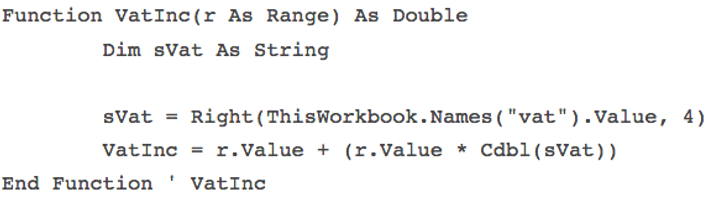
To create a User Defined Function that uses it to add VAT, try:
Named Constants Excel

Use in your workbook as follows “=VatInc(A1). The “vat” value includes the equal sign (“=0.14”). This function uses Right to strip that out, otherwise an error will result. Cdbl converts the string.

Bio: This article was written by Jasper Cook, Excel guru and trombonist of note. Call or email us if KRS can assist you with your Excel: enquiries@krs.co.dev

Looking for a software partner?

Tell us about your project and we’ll show you how our team can help.

Contact Us

Found this useful? Share it.

Written by

KRS

More musings →

Keep reading

Selection of software book covers in a collage Training & Facilitation

27 May 2025 · Lor Steyn

Our recommended books for writing better code

Our top recommended books to improve code quality, design, and organisation, from DDD and TDD to software design classics and best practices.

Minimum Viable Product - MVP Training & Facilitation

1 December 2022 · KRS

Define your Minimum Viable Product (MVP) with KRS

KRS has proven processes to identify your MVP (Minimum Viable Product). Get your product to market as soon as possible with our expertise

KRS Product Owner Graphic Training & Facilitation

29 October 2022 · KRS

KRS Product Owner services in a nutshell

KRS provides clients with senior Product Owner services - a key role in the development and successful delivery of a software solution.